Select Version of EA Desktop:
The Navigation panel is where you load and display the different modules available in Exploration Archives.
The panel is divided into two sections:
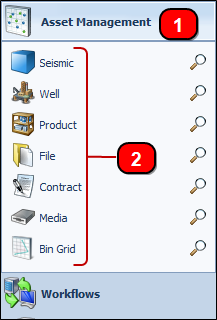
-
The Categories each module falls under. Each Category can be expanded by clicking on them.
-
Under each category are the Modules available to you.
The functions available depend on your security level and your company configuration.
Click a category to display the modules.
The possible categories and their modules include:
|
Asset Management |
Workflows |
Services |
|
|
|
|
Utilities |
Custom |
Management |
|
|
|